
Cheatsheet
Quick-reference commands for daily backupctl operations. All commands below use the backupctl CLI shortcut on your host, installed via scripts/install-cli.sh.
Without CLI shortcuts
If you haven't installed CLI shortcuts via ./scripts/install-cli.sh, prefix all commands with: docker exec backupctl node dist/cli.js instead of backupctl
Example: docker exec backupctl node dist/cli.js health instead of backupctl health
For full details, see the CLI Reference.
Daily Operations

bash
# Run a backup
backupctl run myproject
backupctl run myproject --dry-run
backupctl run --all

# Check status
backupctl status
backupctl status myproject
backupctl status myproject --last 5

# Health check (audit DB, restic repos, disk space, SSH, Uptime Kuma)
backupctl health

# View logs
backupctl logs myproject
backupctl logs myproject --last 20
backupctl logs myproject --failed
Restore
bash
# List snapshots
backupctl snapshots myproject
backupctl snapshots myproject --last 10

# Restore latest
backupctl restore myproject latest /tmp/restore

# Restore specific snapshot
backupctl restore myproject a1b2c3d4 /tmp/restore

# Restore DB only + decompress + import guide
backupctl restore myproject latest /tmp/restore --only db --decompress --guide

# Restore assets only
backupctl restore myproject latest /tmp/restore --only assets
Encrypted Backup Restore
bash
# 1. Restore encrypted dump from restic
backupctl restore myproject latest /tmp/restore --only db

# 2. Copy to local machine (that has the private GPG key)
docker cp backupctl:/tmp/restore/data/backups/myproject/myproject_backup.dump.gpg ./

# 3. Decrypt locally
gpg --decrypt myproject_backup.dump.gpg > myproject_backup.dump

# 4. Verify dump integrity
pg_restore --list myproject_backup.dump | head -20

# 5. Import to database
pg_restore -h localhost -p 5432 -U myuser -d mydb myproject_backup.dump
Configuration
bash
# Validate config
backupctl config validate

# Show resolved config (secrets masked)
backupctl config show myproject

# Reload after editing projects.yml cron schedule
backupctl config reload

# Import GPG key
backupctl config import-gpg-key /app/gpg-keys/key.pub
When to reload vs restart
bash
# projects.yml changes (except cron) → nothing needed, re-read on next run
# projects.yml cron change → reload
backupctl config reload

# .env changes → container restart
docker compose up -d --force-recreate backupctl
Maintenance
bash
# Prune old snapshots (per retention policy)
backupctl prune myproject
backupctl prune --all

# View cache usage
backupctl cache myproject

# Clear cache
backupctl cache myproject --clear
backupctl cache --clear-all
Restic Passthrough
bash
backupctl restic myproject snapshots        # list snapshots
backupctl restic myproject check            # verify repo integrity
backupctl restic myproject stats            # repo size statistics
backupctl restic myproject ls latest        # list files in latest snapshot
backupctl restic myproject find "*.dump"    # find files across snapshots
backupctl restic myproject unlock           # unlock stuck repository
backupctl restic myproject init             # initialize new repo
backupctl restic myproject diff abc def     # diff two snapshots
First-Time Setup
bash
# 1. Create directories on Hetzner Storage Box
docker exec -i backupctl sftp -i /home/node/.ssh/id_ed25519 \
  -P 23 -o StrictHostKeyChecking=accept-new \
  u123456@u123456.your-storagebox.de <<'EOF'
mkdir backups
mkdir backups/myproject
bye
EOF

# 2. Initialize restic repository
backupctl restic myproject init

# 3. Run health check
backupctl health

# 4. Dry run
backupctl run myproject --dry-run

# 5. First real backup
backupctl run myproject

# 6. Verify
backupctl snapshots myproject --last 1
Docker Network
bash
# Connect to all project Docker networks
backupctl network connect

# Connect to a specific project's network
backupctl network connect myproject
Docker Commands
bash
# Container lifecycle
docker compose up -d                 # start all containers
docker compose down                  # stop all containers
docker compose down -v               # stop + remove volumes
docker compose ps                    # check container status
docker compose logs -f backupctl     # follow application logs

# Shell into container
docker exec -it backupctl sh

# Container restart (after .env changes)
docker compose up -d --force-recreate backupctl
Database Import (After Restore)
bash
# PostgreSQL (custom format — the default)
pg_restore -h localhost -p 5432 -U myuser -d mydb --clean --if-exists restored.dump

# PostgreSQL (plain SQL)
psql -h localhost -p 5432 -U myuser -d mydb < restored.sql

# MySQL
gunzip restored.sql.gz
mysql -h localhost -P 3306 -u myuser -p mydb < restored.sql

# MongoDB (archive)
mongorestore --host localhost --port 27017 -u myuser -d mydb --gzip --archive=restored.archive

# MongoDB (directory)
mongorestore --host localhost --port 27017 -u myuser -d mydb --gzip restored_dir/
GPG Operations
bash
# Decrypt a backup file
gpg --decrypt file.dump.gpg > file.dump

# List imported keys (inside container)
docker exec backupctl gpg --list-keys

# Import a key (inside container)
docker exec backupctl gpg --import /app/gpg-keys/backup.pub

# Export your public key for the server
gpg --export --armor your@email.com > gpg-keys/backup.pub
Diagnostics
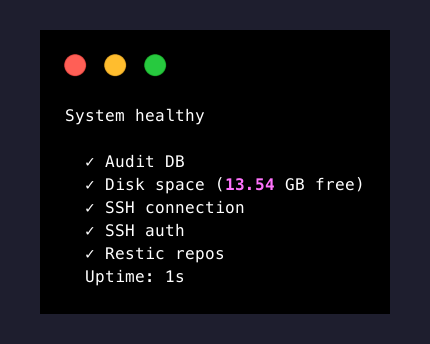
bash
# System health
backupctl health

# Verbose mode — shows bootstrap details
backupctl -v health

# Pre-flight check (no actual backup)
backupctl run myproject --dry-run

# Check for stale lock files
docker exec backupctl find /data/backups -name ".lock" -ls

# View fallback audit entries
docker exec backupctl cat /data/backups/.fallback-audit/fallback.jsonl

# View today's application log
docker exec backupctl cat /data/backups/.logs/backupctl-$(date +%Y-%m-%d).log

# Force remove a stale lock
docker exec backupctl rm /data/backups/myproject/.lock

# Check environment variables
docker exec backupctl env | sort

# Test SSH connectivity to storage box
docker exec backupctl ssh -F /home/node/.ssh/config \
  -i /home/node/.ssh/id_ed25519 -p 23 \
  u123456@u123456.your-storagebox.de ls

# Test database connectivity
docker exec backupctl pg_isready -h backupctl-audit-db -p 5432

# Verify backup integrity
backupctl restic myproject check
Exit Codes
| Code | Meaning |
|---|---|
0 | Success |
1 | General failure |
2 | Backup already in progress (lock held) |
3 | Configuration validation error |
4 | Connectivity error (DB, SSH, restic) |
5 | Partial success (run --all: some succeeded, some failed) |
File Locations (Inside Container)
| Path | Description |
|---|---|
/data/backups/<project>/ | Project backup dumps |
/data/backups/<project>/.lock | Per-project lock file |
/data/backups/.fallback-audit/fallback.jsonl | JSONL fallback audit entries |
/data/backups/.logs/ | Winston log files (daily rotation) |
/app/config/projects.yml | Project configuration |
/home/node/.ssh/ | SSH keys for restic SFTP |
/app/gpg-keys/ | GPG public keys |
File Locations (Host)
| Path | Description |
|---|---|
config/projects.yml | Project configuration (mounted read-only) |
.env | Global secrets and defaults |
ssh-keys/ | SSH keys + config + known_hosts (mounted read-only) |
gpg-keys/ | GPG keys (mounted read-only) |
scripts/ | Host-side management scripts |
Something broken? — Troubleshooting | FAQ | Report an issue