
Backup Flow
This document is a deep dive into the 13-step backup orchestration pipeline. It covers every stage, the retry policy, concurrency model, snapshot tagging, failure recovery, and notification formats.
The orchestration is implemented in RunBackupUseCase (application layer), which coordinates domain ports without containing business logic itself. Each step calls a port interface — the infrastructure layer provides the concrete adapters.
The 11-Step Flow
Every backup run follows this exact sequence. AuditLogPort.trackProgress(runId, stage) is called at the start of each step to provide real-time visibility into the current stage.
| Step | Stage | Action | Retryable | Notes |
|---|---|---|---|---|
| 0 | Lock | BackupLockPort.acquire() | — | File-based .lock per project |
| 0b | Audit | AuditLogPort.startRun() | — | Returns runId (UUID) for tracking |
| 1 | NotifyStarted | NotifierPort.notifyStarted() | No | Slack, Email, or Webhook |
| 2 | PreHook | HookExecutorPort.execute(preBackup) | No | Runs only if hooks.pre_backup is configured |
| 3 | Dump | DatabaseDumperPort.dump() | Yes | Always compressed; adapter chosen by DumperRegistry |
| 4 | Verify | DatabaseDumperPort.verify() | Yes | Runs only if verification.enabled is true |
| 5 | Encrypt | DumpEncryptorPort.encrypt() | Yes | Runs only if encryption.enabled is true |
| 6 | Sync | RemoteStoragePort.sync(paths, options) | Yes | Restic over SFTP; options include tags and snapshotMode |
| 7 | Prune | RemoteStoragePort.prune() | Yes | Applies retention policy from project config |
| 8 | Cleanup | LocalCleanupPort.cleanup() | Yes | Removes local dump files older than retention.local_days |
| 9 | PostHook | HookExecutorPort.execute(postBackup) | No | Runs only if hooks.post_backup is configured |
| 10 | Audit | AuditLogPort.finishRun(runId, result) | — | Falls back to JSONL if audit DB is down |
| 11 | Notify | NotifierPort.notifySuccess() or notifyFailure() | — | Falls back to JSONL if notification fails |
| 12 | Heartbeat | HeartbeatMonitorPort.sendHeartbeat() | — | Sends up or down to Uptime Kuma (if configured) |
| 13 | Unlock | BackupLockPort.release() | — | Always executed, even on failure |
Steps 2, 4, 5, and 12 are conditional — they are skipped entirely if their respective config flags are not set. The orchestrator logs a [SKIP] message when skipping a conditional step.
Step 13 (Unlock) runs in a finally block, guaranteeing lock release regardless of outcome.
Retry Policy
The retry policy is implemented as a pure function in the domain layer (domain/backup/policies/retry.policy.ts). It has no framework dependencies and is fully testable.
Retryable Stages
Stages 3 through 8 are retryable:
| Stage | Typical Failure |
|---|---|
| Dump | Database connection timeout, disk full |
| Verify | Corrupt dump file, verification tool crash |
| Encrypt | GPG key unavailable, disk full |
| Sync | SSH connection dropped, SFTP timeout |
| Prune | Restic lock conflict, repository error |
| Cleanup | File permission error, disk I/O error |
Non-Retryable Stages
These stages fail immediately without retry:
| Stage | Reason |
|---|---|
| PreHook | User-defined script — retrying may cause side effects |
| PostHook | User-defined script — retrying may cause side effects |
| Audit | Infrastructure concern — should not block backup flow |
| Notify | Infrastructure concern — should not block backup flow |
Configuration
| Environment Variable | Default | Description |
|---|---|---|
BACKUP_RETRY_COUNT | 3 | Maximum number of retry attempts per stage |
BACKUP_RETRY_DELAY_MS | 5000 | Base delay before first retry (milliseconds) |
Exponential Backoff
The delay between retries increases exponentially:
delay = BACKUP_RETRY_DELAY_MS * 2^attempt| Attempt | Delay (with 5000ms base) |
|---|---|
| 1st retry | 5,000 ms (5s) |
| 2nd retry | 10,000 ms (10s) |
| 3rd retry | 20,000 ms (20s) |
Error Typing
Each failure produces a BackupStageError with:
stage— theBackupStageenum valueoriginalError— the underlying error from the adapterisRetryable— whether the stage supports retry
The orchestrator calls retryPolicy.evaluateRetry(error, attemptCount) to decide whether to retry or propagate the failure.
Concurrency Model
Per-Project File Lock
Each project gets its own lock file at {BACKUP_BASE_DIR}/{project}/.lock. The lock file contains the PID and start timestamp of the process holding the lock.
# Example: /data/backups/vinelab/.lock
pid=1234
started=2026-03-18T00:00:05.000Z
Cron Overlap
When a cron-triggered backup fires while a previous run of the same project is still active, the BackupLockPort.acquireOrQueue() method queues the new run. It waits for the lock to be released, then starts. This prevents missed scheduled backups.
CLI Collision
When a user manually triggers backupctl run <project> while a backup is already running, the BackupLockPort.acquire() method returns false immediately. The CLI command exits with code 2 and a descriptive error message — it does not wait.
Sequential --all
backupctl run --all processes projects sequentially in the order they appear in config/projects.yml. If one project fails, the orchestrator logs the failure and moves to the next project. The final exit code is:
0— all projects succeeded5— at least one project succeeded and at least one failed1— all projects failed
Lock Lifecycle
acquire() → backup runs → release() (in finally block)
                ↓ (on crash)
         RecoverStartupUseCase cleans stale locks on next boot
Snapshot Tagging
Restic snapshots are tagged to enable filtering and selective restore. The tagging strategy depends on the project's restic.snapshot_mode setting.
Combined Mode
A single restic snapshot contains both the database dump and all asset directories. Tagged with:
backupctl:combined, project:{name}Example for vinelab:
backupctl:combined, project:vinelabSeparate Mode
The database dump and each asset directory are stored in separate restic snapshots. Tagged individually:
Database snapshot:
backupctl:db, project:{name}Asset snapshots (one per path):
backupctl:assets:{path}, project:{name}Example for project-x with one asset path:
backupctl:db, project:project-x
backupctl:assets:/data/projectx/storage, project:project-x
Tag Usage
Tags are used by:
backupctl snapshots <project>— filters snapshots byproject:{name}tagbackupctl restore <project> <snap> <path> --only db— filters bybackupctl:dbtagbackupctl restore <project> <snap> <path> --only assets— filters bybackupctl:assets:*tag
Timeout Alerting
Projects can define a timeout_minutes value in their YAML config. When a backup run exceeds this duration, the orchestrator fires NotifierPort.notifyWarning(projectName, message) to alert operators.
The backup is NOT killed. It continues running to completion. The timeout alert is purely informational — it helps operators detect stuck or unusually slow backups without risking data loss from a hard kill.
The timeout check runs between each step. If the elapsed time exceeds timeout_minutes at any step boundary, the warning fires once.
Missing Asset Handling
If a configured asset path does not exist on disk when the backup runs, the orchestrator:
- Logs a warning:
Asset path not found: /data/vinelab/missing-dir - Fires
NotifierPort.notifyWarning(projectName, message)with details - Continues the backup with the remaining asset paths
Missing assets are not fatal. The backup completes with whatever assets are available. This handles cases where asset directories are conditionally created by the application.
The --dry-run flag checks asset path existence and reports missing paths as warnings (not failures) in the pre-flight output.
Failure Recovery
Audit DB Unavailable
If the audit database is unreachable when the orchestrator attempts to write the backup result (step 10), the result is written to the JSONL fallback file instead:
{BACKUP_BASE_DIR}/.fallback-audit/fallback.jsonlEach line is a complete JSON object with the full audit record. The backup is still considered successful — the audit write failure is an infrastructure concern, not a backup concern. The JSONL entries are replayed automatically by RecoverStartupUseCase on the next container start.
Notification Failure
If the notification adapter fails to deliver the success or failure notification (step 11), the notification payload is written to the same JSONL fallback file as audit entries:
{BACKUP_BASE_DIR}/.fallback-audit/fallback.jsonlLike audit failures, notification failures do not affect the backup's success status. They are retried on the next startup.
Error Propagation
The orchestrator distinguishes between backup-critical and non-critical failures:
| Failure Type | Effect on Backup | Recovery |
|---|---|---|
| Steps 0-9 failure | Backup marked as failed | Retry (if retryable) or abort |
| Step 10 (Audit) failure | Backup still success | JSONL fallback, replay on startup |
| Step 11 (Notify) failure | Backup still success | JSONL fallback, replay on startup |
| Step 12 (Heartbeat) failure | Backup still success | Logged only — missed heartbeat is the signal |
| Step 13 (Unlock) failure | Lock may be stale | Cleaned on startup recovery |
Crash Recovery (Startup)
RecoverStartupUseCase runs automatically during onModuleInit on every container start. It handles all the edge cases that can occur when a container is killed mid-backup.
Recovery Steps
| Order | Action | What It Fixes |
|---|---|---|
| 1 | Mark orphaned started records as failed | Backup runs that were in progress when the container died |
| 2 | Clean orphaned dump files | Partial dump files left on disk from interrupted dumps |
| 3 | Remove stale .lock files | Lock files from processes that no longer exist |
| 4 | Auto-unlock restic repos | Restic locks left by interrupted sync/prune operations |
| 5 | Replay JSONL fallback entries | Audit records and notifications that couldn't be delivered |
| 6 | Auto-import GPG keys from GPG_KEYS_DIR | Keys added to the mounted directory since last boot |
Orphan Detection
A backup run is considered "orphaned" if its audit record has status started and the corresponding .lock file either doesn't exist or references a PID that is no longer running.
JSONL Replay
The fallback files are processed line by line. Each entry is re-attempted against the primary target (audit DB or notification channel). Successfully replayed entries are removed from the file. Failed entries remain for the next startup cycle.
Dry Run Mode
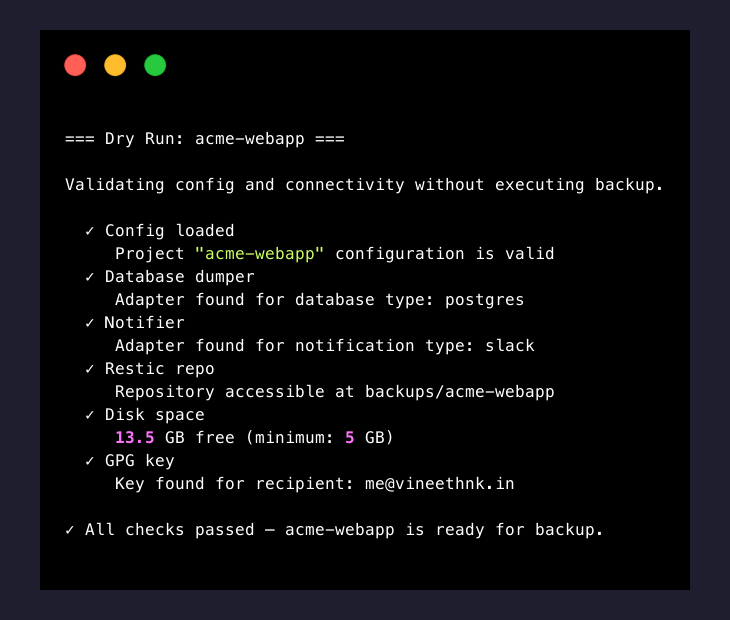
backupctl run <project> --dry-run performs a complete pre-flight validation without executing any destructive operations. No database is dumped, no files are transferred, no notifications are sent.
Checks Performed
| # | Check | What It Validates |
|---|---|---|
| 1 | Config loaded | Project YAML parses correctly, all variables resolved |
| 2 | Database dumper | DumperRegistry can resolve an adapter for the configured database.type |
| 3 | Notifier | NotifierRegistry can resolve an adapter for the configured notification.type |
| 4 | Restic repo | Repository is accessible (read-only snapshots call) |
| 5 | Disk space | Free disk space exceeds HEALTH_DISK_MIN_FREE_GB |
| 6 | GPG key | Key for encryption.recipient exists in the keyring (if encryption enabled) |
| 7 | Asset paths | All configured assets.paths exist on disk |
Each check outputs a pass/fail result. The command exits with code 0 if all checks pass, or 1 if any check fails.
Notification Formats
backupctl sends five types of notifications through the configured channel (Slack, Email, or Webhook). Each type has a consistent structure across all channels.
Started
Sent at the beginning of each backup run (step 1).
Slack/Email text:
🔄 Backup started for vinelab
Run ID: a1b2c3d4
Time: 2026-03-18 00:00:05 (Europe/Berlin)
Success
Sent when a backup completes successfully (step 11).
Slack/Email text:
✅ Backup completed for vinelab
Run ID: a1b2c3d4
Duration: 1m 19s
Dump size: 145.2 MB
Snapshot: abc12345
Repository size: 1.8 GB
Failure
Sent when a backup fails at any stage (step 11).
Slack/Email text:
❌ Backup failed for vinelab
Run ID: a1b2c3d4
Failed at stage: Sync (attempt 3/3)
Duration: 2m 10s
Error: SSH connection refused
Timeout Warning
Sent when a backup exceeds timeout_minutes (mid-run, between steps).
Slack/Email text:
⚠️ Backup timeout warning for vinelab
Run ID: a1b2c3d4
Elapsed: 32m (timeout: 30m)
Current stage: Sync (6/11)
The backup is still running and has not been killed.
Daily Summary
Sent on the schedule defined by DAILY_SUMMARY_CRON (default: 0 7 * * *).
Slack/Email text:
📊 Daily Backup Summary — 2026-03-18

  ✅ vinelab     — success (1m 19s)
  ✅ project-x   — success (1m 25s)
  ❌ project-y   — failed (Dump: connection refused)

2 of 3 backups succeeded. 1 failure requires attention.
Webhook JSON Payload
All notification types sent via the webhook adapter use this JSON structure:
{
  "event": "backup_success",
  "project": "vinelab",
  "text": "✅ Backup completed for vinelab\nRun ID: a1b2c3d4\nDuration: 1m 19s\nDump size: 145.2 MB\nSnapshot: abc12345\nRepository size: 1.8 GB",
  "data": {
    "runId": "a1b2c3d4",
    "project": "vinelab",
    "status": "success",
    "duration": 79,
    "dumpSize": 152253030,
    "snapshotId": "abc12345",
    "repositorySize": 1932735283,
    "startedAt": "2026-03-18T00:00:05.000Z",
    "finishedAt": "2026-03-18T00:01:24.000Z"
  }
}
The event field uses underscore notation: backup_started, backup_success, backup_failed, backup_warning, daily_summary.
The text field contains the same markdown-formatted message sent to Slack/Email — suitable for display in chat integrations or logging.
The data field contains machine-readable structured data for programmatic consumption.
Getting Help
- Backup failing at a specific stage? — Troubleshooting covers common errors per stage
- Still stuck? — Report an issue on GitHub
What's Next
- Recover from a snapshot — Restore Guide covers browsing snapshots, extracting files, and importing database dumps.
- CLI commands — CLI Reference documents all 14 commands with flags, arguments, and examples.
- Troubleshooting — Troubleshooting covers common errors and recovery procedures.