
CLI Reference
backupctl provides 16 commands for managing backups, restores, health checks, configuration, networking, upgrades, and direct restic access. Every command returns structured exit codes suitable for scripting and CI/CD pipelines.
Entry Points
CLI shortcuts (recommended):
backupctl <command>               # production
backupctl-dev <command>           # development
Install these with ./scripts/install-cli.sh. See Installation → CLI Shortcuts.
Docker exec (without shortcuts):
docker exec backupctl node dist/cli.js <command>          # production
docker exec backupctl-dev npx ts-node -r tsconfig-paths/register src/cli.ts <command>  # dev
All examples in this document use the shorthand backupctl for brevity.
Global Option: --verbose / -v
Add -v or --verbose to any command to see detailed NestJS bootstrap logs, module initialization, and debug-level messages. Useful for diagnosing slow startup or connectivity issues.
backupctl -v health
backupctl --verbose run myproject --dry-run
Without verbose, the CLI only shows warnings and errors during bootstrap. With verbose, you see every step: module loading, DB connection, GPG key imports, notifier registration, etc.
Table of Contents
- run — trigger backup or simulate with dry run
- status — backup status overview
- health — system health checks
- restore — restore files from snapshot
- snapshots — list restic snapshots
- prune — manual restic prune
- logs — query audit logs
- config — validate, show, reload, import GPG keys
- cache — restic cache management
- restic — restic passthrough
- network — Docker network management
- Global Behaviors — exit codes, concurrency, logging
run
Trigger a backup for a single project or all enabled projects. Supports dry run mode for pre-flight validation without executing the actual backup.
Syntax
backupctl run <project> [--dry-run]
backupctl run --all
Arguments & Options
| Argument / Option | Required | Description |
|---|---|---|
<project> | Yes (unless --all) | Project name as defined in config/projects.yml |
--dry-run | No | Validate config and connectivity without executing backup |
--all | No | Run backups for all enabled projects sequentially |
Exit Codes
| Code | Meaning |
|---|---|
0 | Backup completed successfully |
1 | Backup failed |
2 | Backup already in progress (lock held) |
3 | Configuration validation error |
4 | Connectivity error (DB, SSH, restic) |
5 | Partial success (with --all: some projects succeeded, some failed) |
Examples
Dry run — all checks pass:
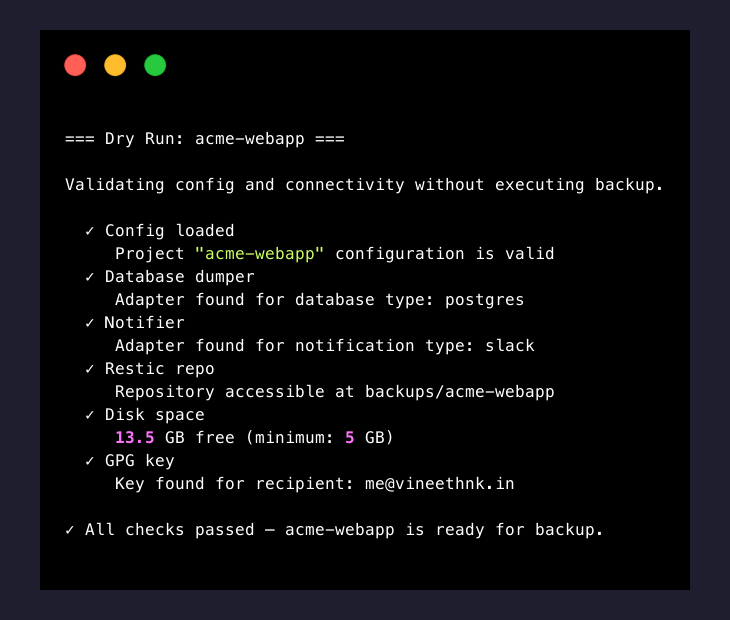
Dry run — failure detected:
$ backupctl run vinelab --dry-run

=== Dry Run: vinelab ===
Validating config and connectivity without executing backup.
  ✅ Config loaded — Project "vinelab" configuration is valid
  ✅ Database dumper — Adapter found for database type: postgres
  ✅ Notifier — Adapter found for notification type: slack
  ❌ Restic repo — Cannot access repository at /backups/vinelab: repository does not exist
  ✅ Disk space — 42.0 GB free (minimum: 5 GB)
  ✅ GPG key — Key found for recipient: vinelab-backup@company.com
  ⚠️  Asset paths — 1 of 2 path(s) missing: /data/vinelab/assets

❌ 2 check(s) failed — vinelab is NOT ready for backup.
Single project backup:

All projects — mixed results:
$ backupctl run --all

[2026-03-18 01:00:00] Running backups for 3 enabled project(s)...

[2026-03-18 01:00:00] [1/3] vinelab — starting...
[2026-03-18 01:01:19] [1/3] vinelab — ✅ completed in 1m 19s

[2026-03-18 01:01:20] [2/3] project-x — starting...
[2026-03-18 01:02:45] [2/3] project-x — ✅ completed in 1m 25s

[2026-03-18 01:02:46] [3/3] project-y — starting...
[2026-03-18 01:02:52] [3/3] project-y — ❌ failed at stage Dump: connection refused

=== Summary ===
  ✅ vinelab     — success (1m 19s)
  ✅ project-x   — success (1m 25s)
  ❌ project-y   — failed (Dump: connection refused)

⚠️  Partial success: 2 of 3 projects completed. Exit code: 5
Lock collision:
$ backupctl run vinelab

❌ Backup already in progress for vinelab.
   Lock held since 2026-03-18 00:00:05 (PID: 1234)
   Use "backupctl status vinelab" to check progress.

Exit code: 2
status
Display backup status for all projects or detailed history for a single project.
Syntax
backupctl status
backupctl status <project> [--last <n>]
Arguments & Options
| Argument / Option | Required | Description |
|---|---|---|
<project> | No | Show detailed history for a specific project |
--last <n> | No | Number of recent runs to display (default: 10) |
Exit Codes
| Code | Meaning |
|---|---|
0 | Status retrieved successfully |
1 | Failed to retrieve status |
3 | Unknown project name |
Examples
All projects summary:
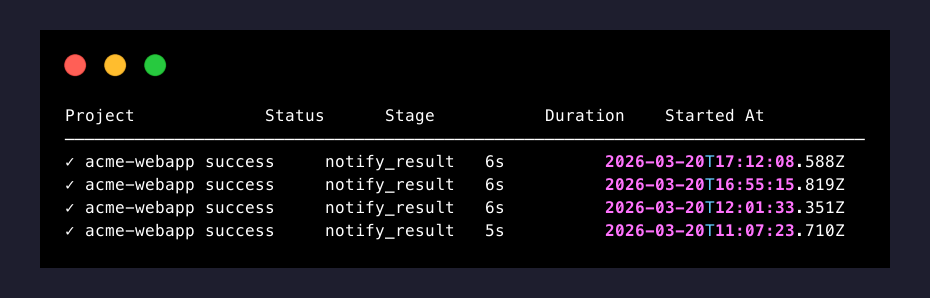
Single project history:
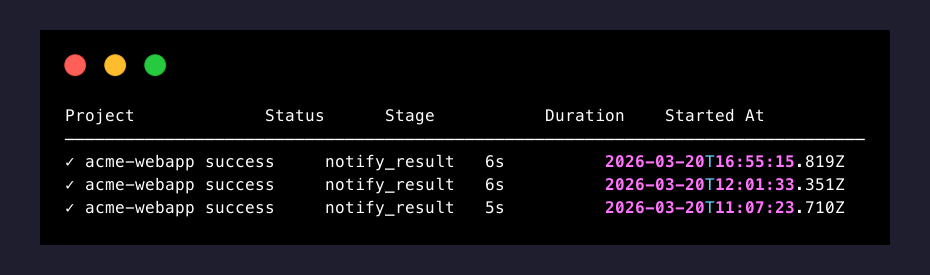
In-progress backup:
$ backupctl status vinelab

=== vinelab — Current Status ===

🔄 Backup in progress (run: a1b2c3d4)
   Started: 2026-03-18 00:00:05 (35s ago)
   Current stage: Sync (6/11)
   Lock held by PID: 1234
health
Run comprehensive health checks against all infrastructure dependencies. No arguments required.
Syntax
backupctl healthArguments & Options
None.
Exit Codes
| Code | Meaning |
|---|---|
0 | All checks passed |
1 | One or more checks failed |
4 | Connectivity error (DB, SSH, or restic unreachable) |
Examples
Healthy system:
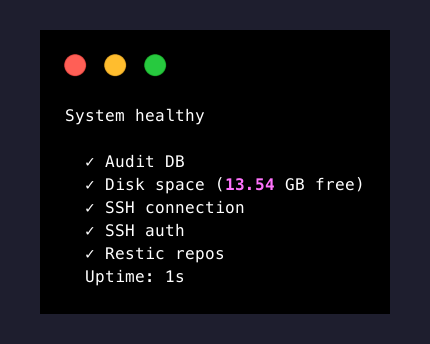
Degraded system:
$ backupctl health

System unhealthy

  ✓ Audit DB
  ✗ Disk space (3.2 GB free)
  ✓ Storage: vinelab (sftp)
  ✗ Storage: project-x (s3) (Fatal: unable to open config file: Stat: The request signature we calculated does not match the signature you provided)
  ✓ Storage: project-y (rclone)
  Uptime: 2h 15m

Exit code: 1
Each project is probed through its own backend, so one unreachable repository does not mask the others.
restore
Restore files from a restic snapshot to a target directory. Supports selective restore (--only db or --only assets) and provides human-readable import instructions with --guide.
Syntax
backupctl restore <project> <snapshot-id> <target-path> [--only db|assets] [--decompress] [--guide]Arguments & Options
| Argument / Option | Required | Description |
|---|---|---|
<project> | Yes | Project name |
<snapshot-id> | Yes | Restic snapshot ID (short hash or latest) |
<target-path> | Yes | Directory to extract files into |
--only db | No | Restore only the database dump |
--only assets | No | Restore only asset directories |
--decompress | No | Decompress dump file after restore |
--guide | No | Print database import instructions after restore |
Exit Codes
| Code | Meaning |
|---|---|
0 | Restore completed successfully |
1 | Restore failed |
3 | Configuration error (unknown project) |
4 | Connectivity error (restic repo unreachable) |
Examples
Basic restore:
$ backupctl restore vinelab abc12345 /tmp/restore

Restoring snapshot abc12345 for vinelab...
  Source: sftp:u123456@u123456.your-storagebox.de:/backups/vinelab
  Target: /tmp/restore

Restoring files...
  restored /tmp/restore/vinelab_db_20260318_000032.sql.gz
  restored /tmp/restore/uploads/ (1,248 files)
  restored /tmp/restore/assets/ (346 files)

✅ Restore complete. 3 items restored to /tmp/restore
Latest snapshot with decompress and guide:
$ backupctl restore vinelab latest /tmp/restore --decompress --guide

Restoring latest snapshot (abc12345) for vinelab...
  Source: sftp:u123456@u123456.your-storagebox.de:/backups/vinelab
  Target: /tmp/restore

Restoring files...
  restored /tmp/restore/vinelab_db_20260318_000032.sql.gz
  restored /tmp/restore/uploads/ (1,248 files)
  restored /tmp/restore/assets/ (346 files)

Decompressing dump...
  vinelab_db_20260318_000032.sql.gz → vinelab_db_20260318_000032.sql (487 MB)

✅ Restore complete.

=== Database Import Guide (postgres) ===

The dump file is a pg_dump custom-format archive. To import:

  1. Create the target database (if it doesn't exist):
     createdb -h <host> -U <user> vinelab_db

  2. Restore the dump:
     pg_restore -h <host> -U <user> -d vinelab_db /tmp/restore/vinelab_db_20260318_000032.sql

  3. If restoring to an existing database, add --clean to drop objects first:
     pg_restore -h <host> -U <user> -d vinelab_db --clean /tmp/restore/vinelab_db_20260318_000032.sql

Note: The dump was originally encrypted with GPG. It was decrypted
automatically during restore. The .sql file is ready for import.
Selective restore — database only:
$ backupctl restore vinelab abc12345 /tmp/restore --only db

Restoring snapshot abc12345 for vinelab (database only)...
  Source: sftp:u123456@u123456.your-storagebox.de:/backups/vinelab
  Target: /tmp/restore

Restoring files...
  restored /tmp/restore/vinelab_db_20260318_000032.sql.gz

✅ Restore complete. Database dump restored to /tmp/restore
Selective restore — assets only:
$ backupctl restore vinelab abc12345 /tmp/restore --only assets

Restoring snapshot abc12345 for vinelab (assets only)...
  Source: sftp:u123456@u123456.your-storagebox.de:/backups/vinelab
  Target: /tmp/restore

Restoring files...
  restored /tmp/restore/uploads/ (1,248 files)
  restored /tmp/restore/assets/ (346 files)

✅ Restore complete. Asset directories restored to /tmp/restore
snapshots
List restic snapshots for a project. Displays snapshot ID, timestamp, tags, and size.
Syntax
backupctl snapshots <project> [--last <n>]Arguments & Options
| Argument / Option | Required | Description |
|---|---|---|
<project> | Yes | Project name |
--last <n> | No | Number of recent snapshots to display (default: 20) |
Exit Codes
| Code | Meaning |
|---|---|
0 | Snapshots listed successfully |
1 | Failed to list snapshots |
3 | Unknown project name |
4 | Restic repo unreachable |
Examples
Combined snapshot mode:
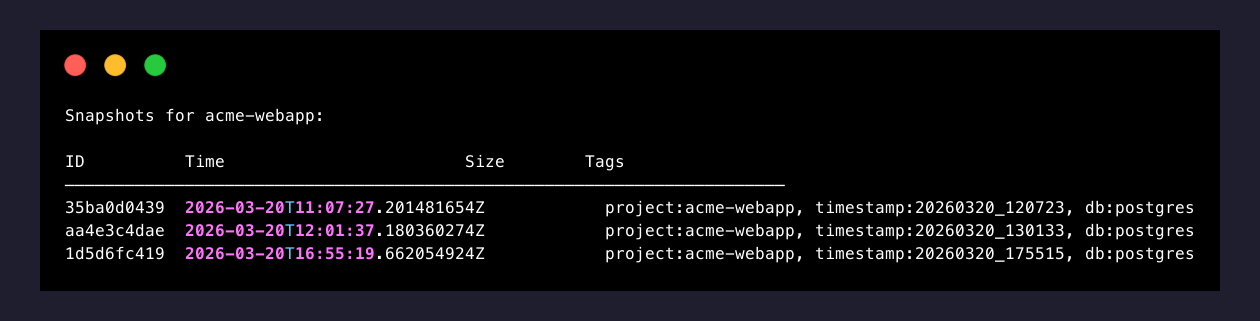
Separate snapshot mode:
$ backupctl snapshots project-x --last 5

=== project-x — Restic Snapshots (separate mode) ===

SNAPSHOT     DATE                  TAGS                                              SIZE
aaa11111     2026-03-18 01:31:15   backupctl:db, project:project-x                   82.4 MB
bbb22222     2026-03-18 01:31:45   backupctl:assets:/data/projectx/storage, ...      63.1 MB
ccc33333     2026-03-17 01:31:10   backupctl:db, project:project-x                   81.9 MB
ddd44444     2026-03-17 01:31:38   backupctl:assets:/data/projectx/storage, ...      62.8 MB
eee55555     2026-03-16 01:31:12   backupctl:db, project:project-x                   82.1 MB

Showing 5 of 56 snapshots. Repository size: 2.4 GB
prune
Manually trigger restic prune for a project or all projects. Applies the retention policy defined in the project's YAML config.
Syntax
backupctl prune <project>
backupctl prune --all
Arguments & Options
| Argument / Option | Required | Description |
|---|---|---|
<project> | Yes (unless --all) | Project name |
--all | No | Prune all enabled projects sequentially |
Exit Codes
| Code | Meaning |
|---|---|
0 | Prune completed successfully |
1 | Prune failed |
3 | Unknown project name |
4 | Restic repo unreachable |
5 | Partial success (with --all) |
Examples
Single project:
$ backupctl prune vinelab

Pruning vinelab with retention: keep_daily=7, keep_weekly=4, keep_monthly=0
  Removed 3 snapshots
  Freed 412.5 MB

✅ Prune complete for vinelab. Repository: 1.4 GB (was 1.8 GB)
All projects:
$ backupctl prune --all

[1/3] vinelab — pruning...
  Removed 3 snapshots, freed 412.5 MB ✅
[2/3] project-x — pruning...
  Removed 5 snapshots, freed 287.3 MB ✅
[3/3] project-y — pruning...
  Removed 1 snapshot, freed 45.0 MB ✅

=== Summary ===
  Total removed: 9 snapshots
  Total freed: 744.8 MB
logs
Query the audit trail for a project's backup history.
Syntax
backupctl logs <project> [--last <n>] [--failed]Arguments & Options
| Argument / Option | Required | Description |
|---|---|---|
<project> | Yes | Project name |
--last <n> | No | Number of recent log entries (default: 20) |
--failed | No | Show only failed backup runs |
Exit Codes
| Code | Meaning |
|---|---|
0 | Logs retrieved successfully |
1 | Failed to retrieve logs |
3 | Unknown project name |
4 | Audit DB unreachable |
Examples
Recent logs:
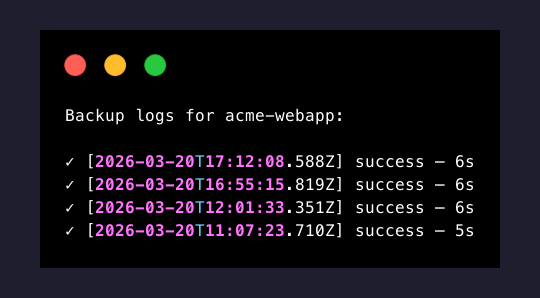
Failed runs only:
$ backupctl logs vinelab --last 10 --failed

=== vinelab — Failed Runs ===

RUN ID      STARTED               DURATION  FAILED STAGE   ERROR
e7f8a9b0    2026-03-14 00:00:03   45s       Dump           connection timeout
f1a2b3c4    2026-03-08 00:00:04   2m 10s    Sync           SSH connection refused
d5e6f7a8    2026-03-01 00:00:05   12s       PreHook        curl: connection refused

Showing 3 of 3 failed runs.
config
Manage project configuration: validate syntax, display resolved config, reload from disk, and import GPG keys.
Syntax
backupctl config validate
backupctl config show <project>
backupctl config reload
backupctl config import-gpg-key <file>
Subcommands
| Subcommand | Description |
|---|---|
validate | Check all project configs for syntax and semantic errors |
show <project> | Display the fully resolved config for a project (secrets masked) |
reload | Reload config/projects.yml and .env without restarting the container |
import-gpg-key <file> | Import a GPG public key for encryption |
Exit Codes
| Code | Meaning |
|---|---|
0 | Operation successful |
1 | Operation failed |
3 | Configuration validation error (with validate) |
Examples
Validate — all valid:
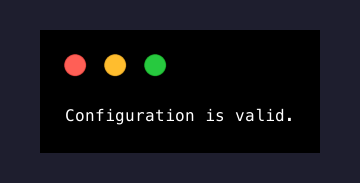
Validate — errors found:
$ backupctl config validate

Validating config/projects.yml...

  ✅ vinelab — valid
  ❌ project-x — 2 error(s):
     • database.password: unresolved variable ${PROJECTX_DB_PASSWORD}
     • retention.keep_daily: must be a non-negative integer
  ✅ project-y — valid

1 of 3 project(s) have errors. Exit code: 3
Show resolved config (secrets masked):
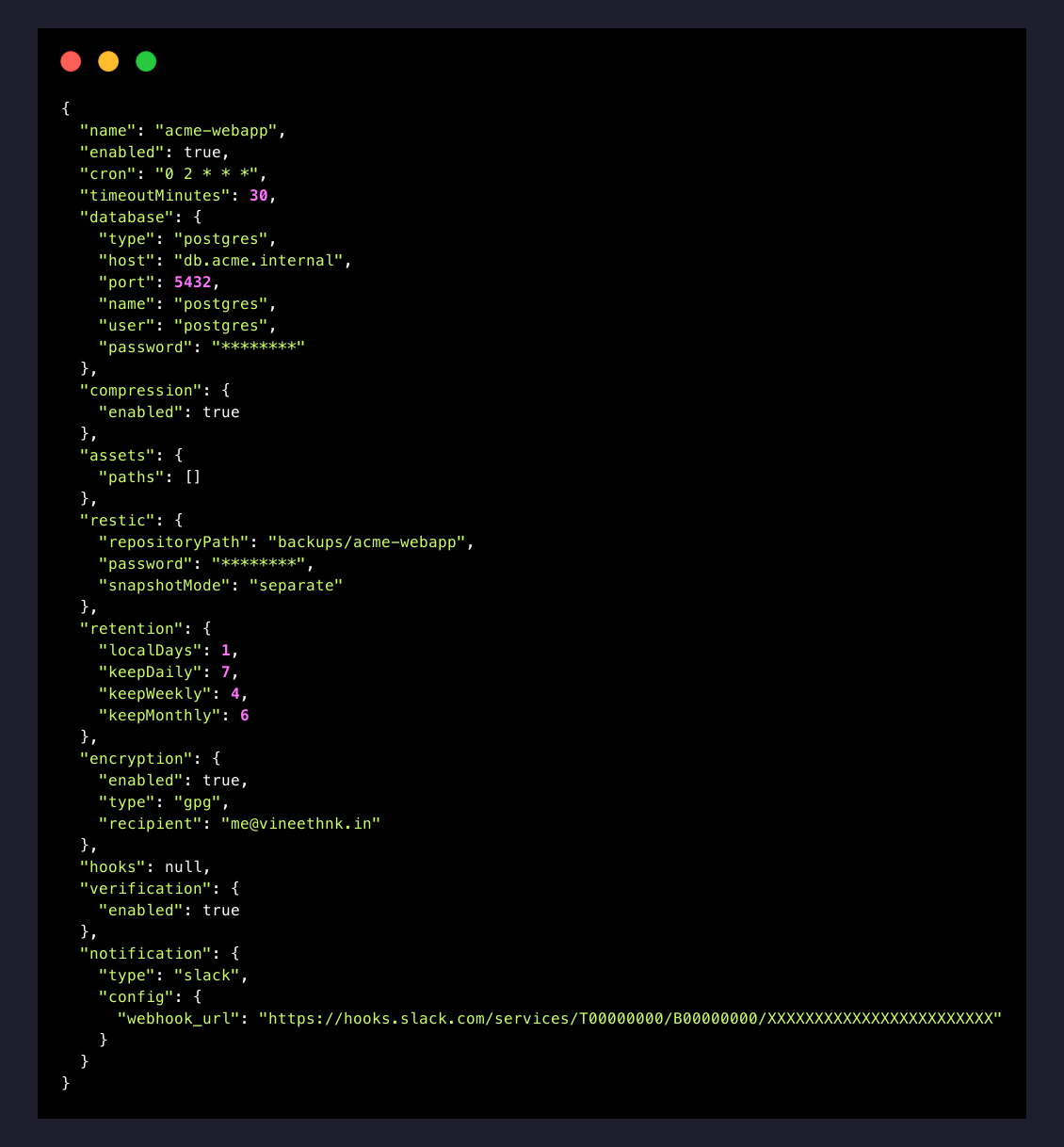
Reload config:
$ backupctl config reload

Reloading configuration...
  Loaded 3 project(s) from config/projects.yml
  Resolved environment variables from .env
  Updated cron schedules

✅ Configuration reloaded. Changes take effect on next backup run.
Import GPG key:
$ backupctl config import-gpg-key /app/gpg-keys/vinelab-backup.pub

Importing GPG key from /app/gpg-keys/vinelab-backup.pub...
  Key ID: 0xABCDEF1234567890
  User ID: vinelab-backup@company.com
  Fingerprint: 1234 5678 ABCD EF01 2345 6789 ABCD EF12 3456 7890

✅ GPG key imported successfully.
cache
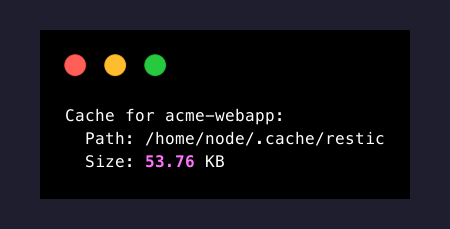
View or clear the restic cache for a project. Useful when restic operations are slow or the cache is corrupted.
Syntax
backupctl cache <project> [--clear]
backupctl cache --clear-all
Arguments & Options
| Argument / Option | Required | Description |
|---|---|---|
<project> | Yes (unless --clear-all) | Project name |
--clear | No | Clear the cache for the specified project |
--clear-all | No | Clear cache for all projects |
Exit Codes
| Code | Meaning |
|---|---|
0 | Operation successful |
1 | Operation failed |
3 | Unknown project name |
Examples
Show cache info:
Clear single project cache:
$ backupctl cache vinelab --clear

Clearing restic cache for vinelab...
  Removed 28.5 MB from /root/.cache/restic/abc123def456

✅ Cache cleared for vinelab.
Clear all caches:
$ backupctl cache --clear-all

Clearing restic cache for all projects...
  vinelab — 28.5 MB cleared
  project-x — 15.2 MB cleared
  project-y — 12.1 MB cleared

✅ Cache cleared for 3 project(s). Total freed: 55.8 MB
restic
Execute restic commands directly against a project's repository. The repository path, password, and SFTP credentials are injected automatically from the project's config — you only supply the restic subcommand and its arguments.
Syntax
backupctl restic <project> <cmd> [args...]Arguments & Options
| Argument / Option | Required | Description |
|---|---|---|
<project> | Yes | Project name (used to resolve repo path and credentials) |
<cmd> | Yes | Restic subcommand to execute |
[args...] | No | Additional arguments passed through to restic |
Exit Codes
| Code | Meaning |
|---|---|
0 | Restic command succeeded |
1 | Restic command failed |
3 | Unknown project name |
4 | Repository unreachable |
Examples
List snapshots:

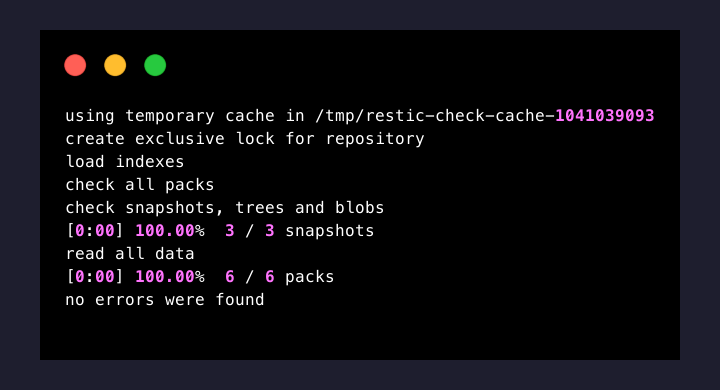
Check repository integrity:
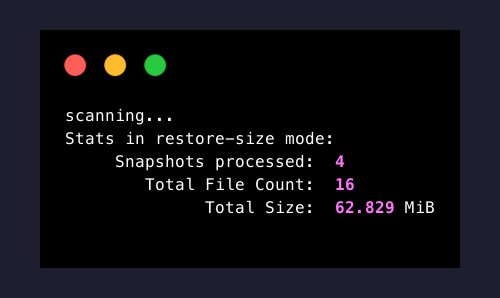
Repository statistics:
List files in latest snapshot:

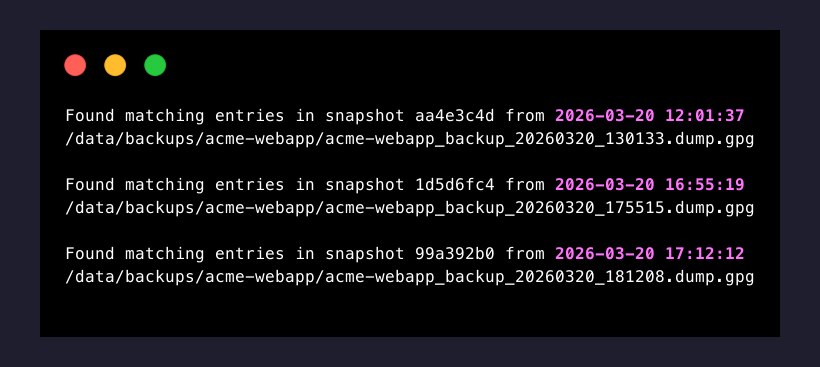
Find a specific file across snapshots:
Unlock stale locks:
$ backupctl restic vinelab unlock

repository abc12345 opened (version 2, compression auto)
successfully removed 1 locks
Initialize a new repository:
$ backupctl restic vinelab init

created restic repository abc12345 at sftp:u123456@u123456.your-storagebox.de:/backups/vinelab

Please note that knowledge of your password is required to access
the repository. Losing your password means that your data is
irrecoverably lost.
Mount repository for browsing (interactive):
$ backupctl restic vinelab mount /mnt/restic

repository abc12345 opened (version 2, compression auto)
Now serving the repository at /mnt/restic
Use another terminal or file manager to browse the snapshots.
When finished, press Ctrl-C or send SIGINT to quit.
network
Manage Docker network connectivity for the backupctl container. Connects the container to project-specific Docker networks so it can reach database containers by hostname.
Syntax
backupctl network connect [project]Subcommands
| Subcommand | Description |
|---|---|
connect | Connect the backupctl container to project Docker networks |
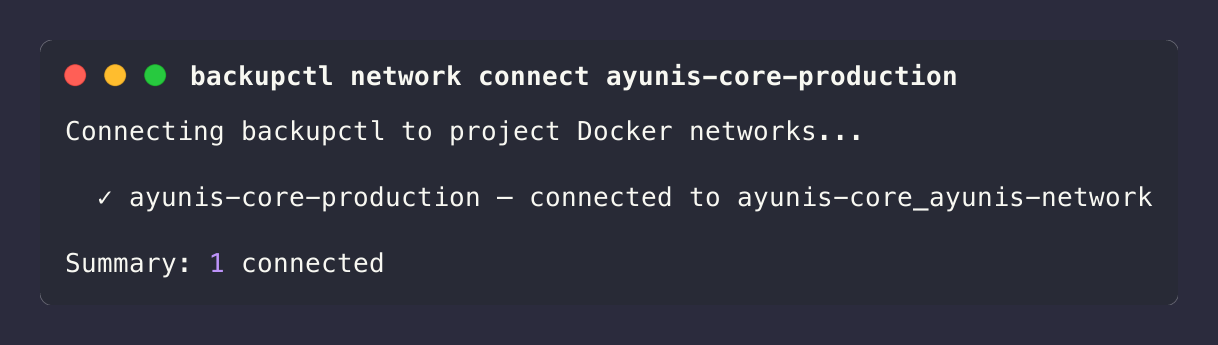
connect <project> | Connect to a specific project's Docker network |
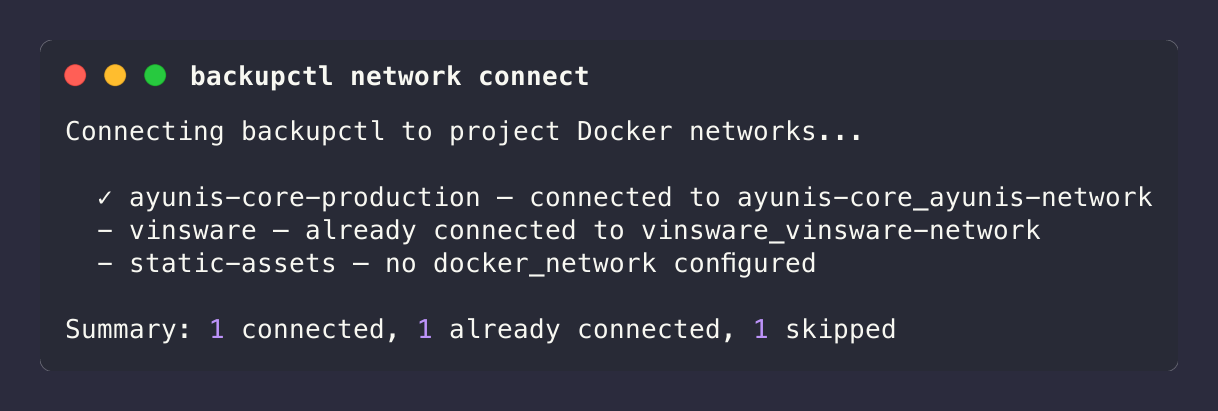
When no project name is given, connect iterates all projects and connects to each one that has a docker_network defined. Projects without docker_network are skipped.
Prerequisites
The Docker socket must be mounted and the container must have permission to access it. Add both to docker-compose.yml:
volumes:
  - /var/run/docker.sock:/var/run/docker.sock:ro
group_add:
  - '${DOCKER_GID:-999}'
If the default GID 999 doesn't match your host, check with stat -c '%g' /var/run/docker.sock and set DOCKER_GID in .env. See Network for full setup details.
Exit Codes
| Code | Meaning |
|---|---|
0 | All connections successful (or already connected) |
1 | All connections failed |
5 | Partial success (some connected, some failed) |
Examples
Connect to all project networks:
Connect to a specific project:
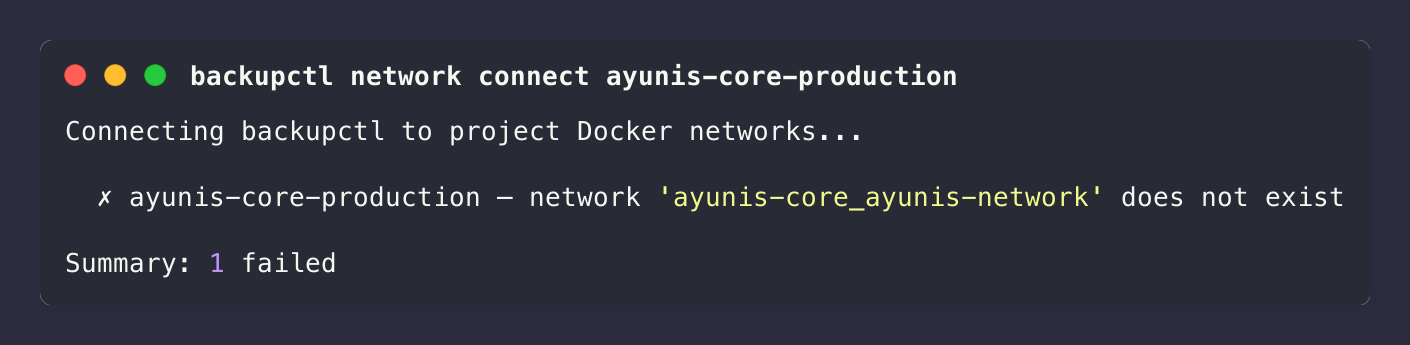
Network does not exist:
upgrade
Check for available updates and display upgrade instructions. This command queries the GitHub Releases API, compares against the currently installed version, and shows how to upgrade if a newer release exists.
Syntax
backupctl upgradeBehavior
- Clears any cached upgrade information
- Queries the GitHub releases for the latest version
- Compares the latest release against the installed version
- If an update is available, shows the release URL and upgrade instructions
- If already on the latest version, confirms it
Exit Codes
| Code | Meaning |
|---|---|
0 | Check completed successfully |
4 | Connectivity error (GitHub API unreachable) |
Examples
Update available:
$ backupctl upgrade

Current version:  v0.1.8
Latest version:   v0.2.0

A new version is available!
Release: https://github.com/vineethkrishnan/backupctl/releases/tag/v0.2.0

To upgrade, run on the host machine:

  backupctl-manage.sh upgrade
Already up to date:
$ backupctl upgrade

Current version:  v0.2.0
Latest version:   v0.2.0

You are on the latest version.
Automatic Upgrade Notifications
backupctl automatically checks for updates on the first CLI command after each deployment. If a newer version is available, a notice appears at the end of the command output:
  ┌──────────────────────────────────────────────────────┐
  │  Update available: v0.1.8 → v0.2.0                  │
  │  Run on host: backupctl-manage.sh upgrade            │
  └──────────────────────────────────────────────────────┘
The check result is cached in ${BACKUP_BASE_DIR}/.upgrade-info so subsequent commands read from cache without hitting the GitHub API.
Suppressed when:
- Development mode (
NODE_ENV=development) - Non-interactive output (piped or redirected stderr)
- Opt-out via
BACKUPCTL_NO_UPDATE_CHECK=1 - Scheduled (cron) backups — these use the HTTP entry point, not the CLI
To upgrade after seeing the notice, run on the host machine:
backupctl-manage.sh upgradeThis pulls the latest code, rebuilds the container, runs migrations, and clears the upgrade check cache.
Global Behaviors
Exit Codes
All commands follow a consistent exit code scheme:
| Code | Meaning | Commands |
|---|---|---|
0 | Success | All commands |
1 | General failure | All commands |
2 | Backup already in progress (lock held) | run |
3 | Configuration validation error | run, status, restore, snapshots, prune, logs, config, cache, restic |
4 | Connectivity error (DB, SSH, restic) | run, health, restore, snapshots, prune, logs, restic, upgrade |
5 | Partial success | run --all, prune --all |
Use exit codes for scripting:
backupctl run vinelab
case $? in
  0) echo "Backup succeeded" ;;
  1) echo "Backup failed" ;;
  2) echo "Already running" ;;
  3) echo "Config error" ;;
  4) echo "Connectivity issue" ;;
esac
Concurrency Model
backupctl uses per-project file-based locks to prevent concurrent backups of the same project:
- Lock location:
{BACKUP_BASE_DIR}/{project}/.lock - Cron-triggered overlap: If a scheduled backup fires while a previous run is still active, the new run queues behind it and starts when the lock is released.
- CLI-triggered collision: If you manually trigger
backupctl run <project>while a backup is already running, the command rejects immediately with exit code2. run --all: Projects are backed up sequentially in the order they appear inconfig/projects.yml. If one project fails, the next project still runs. Exit code5indicates partial success.- Stale locks: If the container crashes mid-backup,
RecoverStartupUseCasecleans up orphaned.lockfiles on the next start.
Log Output
- Console: All commands write structured output to stdout. Errors go to stderr.
- Verbose mode: Add
-vor--verboseto any command to see NestJS bootstrap logs, module initialization, DB connections, and debug messages. Without it, the CLI suppresses all bootstrap noise and only shows warnings/errors. - Log files: The background service writes JSON-formatted logs (via Winston) to
{LOG_DIR}/backupctl-YYYY-MM-DD.logwith daily rotation. - Log level: Controlled by the
LOG_LEVELenvironment variable (default:info). The-vflag overrides this todebugfor the current invocation. - Max size / rotation: Controlled by
LOG_MAX_SIZE(default:10m) andLOG_MAX_FILES(default:5).
Timezone
All timestamps in CLI output, log files, audit records, and file names use the timezone defined by the TIMEZONE environment variable (default: Europe/Berlin). Set this in your .env file to match your operational timezone.
Getting Help
- Command not working? — Troubleshooting covers common errors
- Setup issues? — FAQ for SSH, GPG, Docker networking, and restic problems
- Still stuck? — Report an issue on GitHub
What's Next
- Understand the backup pipeline — Backup Flow explains each of the 11 steps.
- Recover from a snapshot — Restore Guide covers browsing snapshots and importing dumps.
- Host management — Bash Scripts documents
deploy.shandbackupctl-manage.sh. - Quick commands — Cheatsheet for copy-paste daily operations.